Starfarer
Your own AI, on your own hardware, in every room.
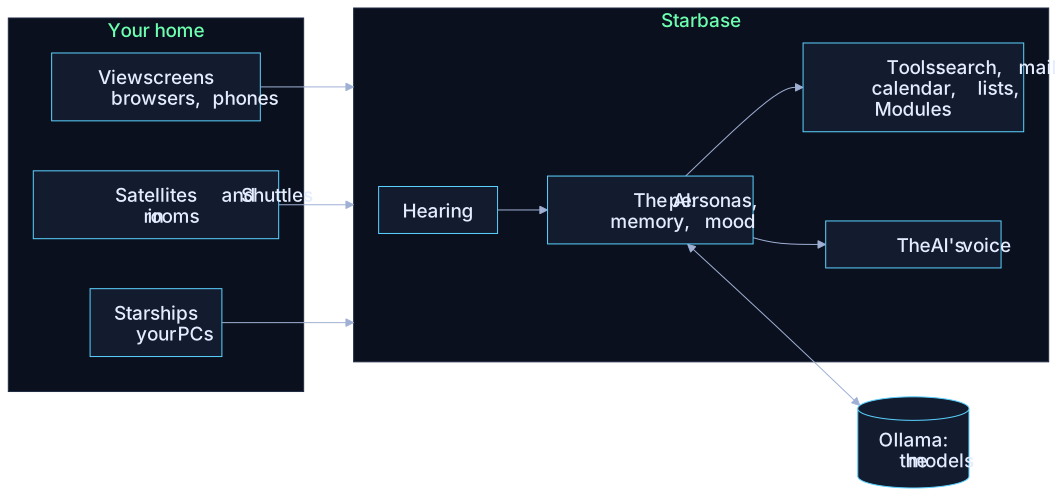
Starfarer is an AI assistant that runs entirely in your home. One computer, the Starbase, runs the AI models and remembers everyone in the house. You talk to it by typing or by voice, from a browser, a speaker in the kitchen, a screen on the wall or your own laptop, and it's the same AI with the same memory of you wherever you are. Its brain never leaves the house.
It comes with four personas, each its own character: Celestra, Nova, Lumina and the ship's Computer. Each person in the house signs in, picks the AI they like, and gets their own conversations, mail, calendar and lists. The household's owner is the Captain; everyone else is crew.
Where to start
| If you want to… | Read |
|---|---|
| Know what it is and what it can do | What Starfarer is |
| Check your PC can run it | What you need |
| Install it | Installing, then First setup |
| Learn your way around | The Bridge and Talking with the AI |
| Put a speaker or screen in a room | Devices and their names |
| Run it for your household | The Captain's job |
| Build a Module for it | For developers |
| Fix something | Troubleshooting |
Everything that connects
 Viewscreen
The Bridge in any browser: a PC, phone or tablet. Nothing to install.
 Satellite
A speaker and mic in a room. Say an AI's name and it answers.
 Shuttle
A screen on the wall or a TV: the AI's hologram, the time, what's coming up.
 Starship
Your own PC or laptop: hold a key to talk, and the AI's hands on that PC when you allow them.
Starfarer is free and open source (AGPL-3.0). It was created by John Seals, with assistance from Claude Code.